TOOLS
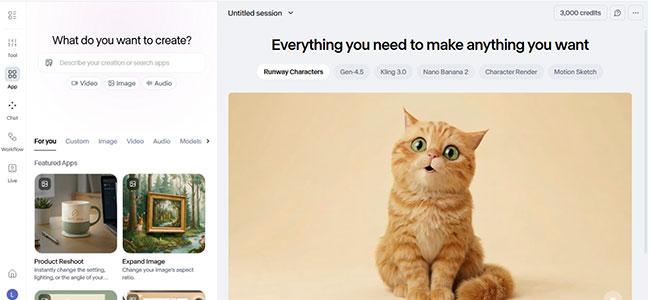
There are three tabs in the Tools feature: Image, Video and Audio.
IMAGE
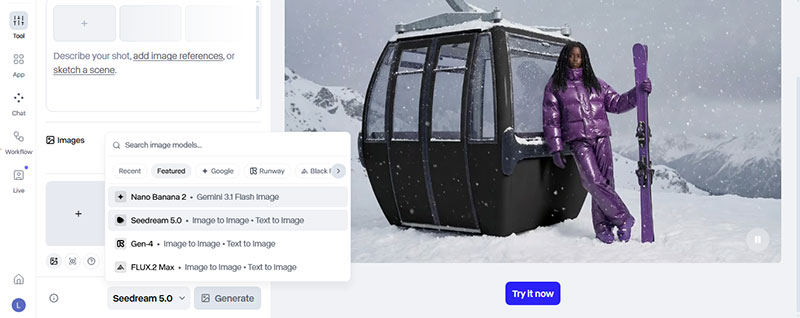
In image tools, you can use image reference using @ + image name, so that the model know specifically which image you mean to get better at understanding the prompt and generate better. There are also quantity of generation (1 or 4), image size and image quality.
Available models for image generation:
Runway — Image Generation
Gen-4 Image
Gen-4 Image Turbo
ByteDance — Image Generation
Seedream 5.0-lite
Google — Image Generation
Nano Banana Pro 2
Nano Banana Pro
Nano Banana
OpenAI — Image Generation
GPT Image 1.5
GPT Image 1 Mini
Black Forest Labs — Image Generation
FLUX.2 Max
FLUX.2 Klein
VIDEO
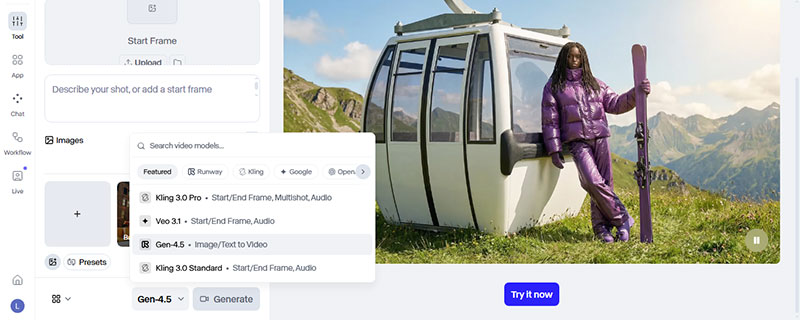
In video tools, there are frames and multishot tab. Can also use image reference, can choose to generate with or without sound, video size, duration, also presents. In presents, there are camera, movement and action, you can see the example in action and once you click on it, prompt automatically created.
Available models for video generation:
Runway — Video Generation
Gen-4.5
Gen-4 Video
Gen-4 Video Turbo
Act-Two
Alibaba — Video Generation
WAN2.2
WAN2.6
WAN2.6 Flash
Google — Video Generation
Veo 3.1
Veo 3
Kling — Video Generation
Kling 3.0 Pro
Kling 3.0 Std
Kling 2.6 Pro
Kling 2.5 Turbo Pro
Kling 2.5 Turbo
Kling 3.0 Motion Control
OpenAI — Video Generation
Sora 2 Pro
Sora 2
AUDIO
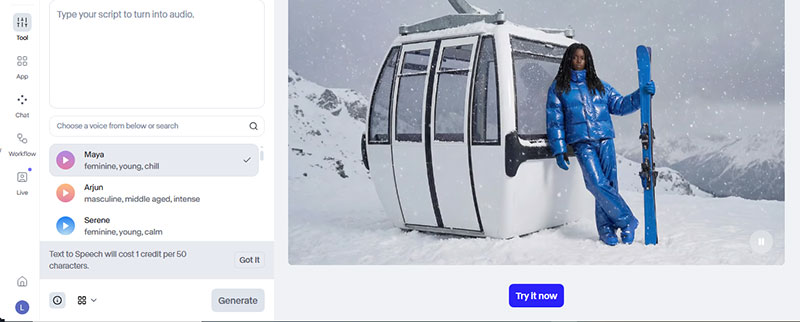
In the audio tools, you can choose character voice and do text to speech.